Looking at our timescale, we decided to split the responsibility of the ancillary tasks in order to ensure both are completed to the highest limits of our ability. After reviewing our individual strengths and interests we came to the conclusion that Roisin and Rachel would take a more prominant role in the webpage production whilst myself and Gemma would manage the digipak.
Obviously the whole group will frequently refer and review each others progress to build a strong theme and motif that will closely tie the three products together.

Friday, 28 January 2011

Done and Dusted...almost!
Finally, I think it's safe to say our music video is nearing the very edge of completion! After watching it multiple times last lesson we confirmed that the main body of the video has really taken shape and is working together with our target audience and themes well. Only minimal amounts of editing are now needed in order to satisfy our collective perfectionist mentality; and most of that is focused on detail and asthetic qualities such as colour manipulation and cropping out imperfections in certain frames, so will not take more than one more lesson. Therefore, our attention can now shift to the construction of our webpage and digipak which are due a week from today.
Thursday, 27 January 2011
Editing!
So today we were doing some final touches to the editing and I thought that I should put some of the 'before and after' shots to show what we have done in post-production. Most of the editing we have done is quite subtle, and although the shot below on the right looks very blue, when the whole video is played, most people do not even notice the colour work we have done.
I have taken a couple of screenshots so that these subtle details can actually be seen to have been a conscious effort on our part, rather than just an accident! We have also added a subtle sepia tone to the autumn shots, and a pink to the spring shots, to emphasise the change in seasons, although the transition is quite subtle.
A new edit that has been made this past week (as thought of by Roisin, who has been having a lot of good ideas recently!), which was to add a split screen during one of the instrumental sections of the song. The 'random' sections were looking a bit dull, and we all agreed, particularly after Gemma's audience feedback, where people commented that these sections looked like 'slideshows of trees'. Roisin had the idea of changing the random shots to shots of Amy playing the piano, like we have at the start of the song, and then she also thought of having a four way split screen. To start with it looked a bit odd, and it didn't really 'go' with the rest of the video, but then we thought of having another four way screen at the very end of the video, to bring together the 'seasons' theme. When we finally did all of this, it actually looked really good, and we are all much more pleased with the finished result than we were before.
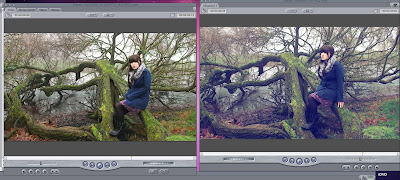 So this is a shot from the 'winter' verse, and whilst the shots looked amazing before we did anything to them, we all agreed that the greens were far too prominent to really represent the winter season, and so what I did was too un-balance the colour, and make the shadows in the clip 100% blue, rather than 50%. What this did is to just make the shot look a lot 'colder', but without being too extreme.
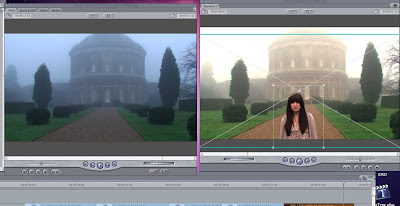 This was what we did in today's lesson. Whilst we had done the colour alteration previously, none of us were too happy with the way that the shots flickered when they cut between eachother. This was where Roisin's genius idea number two for today came in! She suggested that we have one still shot of the house through the wholse verse, and then crop the sections where Amy moves over the top . This proved to be a fantastic idea, as it worked very, very well for the final shot. It was suggested that we reshoot that one shot so the transition would be smoother. What was brilliant was that we could move the cropped shot around and so it was smooth! Yippee!
I have taken a couple of screenshots so that these subtle details can actually be seen to have been a conscious effort on our part, rather than just an accident! We have also added a subtle sepia tone to the autumn shots, and a pink to the spring shots, to emphasise the change in seasons, although the transition is quite subtle.
A new edit that has been made this past week (as thought of by Roisin, who has been having a lot of good ideas recently!), which was to add a split screen during one of the instrumental sections of the song. The 'random' sections were looking a bit dull, and we all agreed, particularly after Gemma's audience feedback, where people commented that these sections looked like 'slideshows of trees'. Roisin had the idea of changing the random shots to shots of Amy playing the piano, like we have at the start of the song, and then she also thought of having a four way split screen. To start with it looked a bit odd, and it didn't really 'go' with the rest of the video, but then we thought of having another four way screen at the very end of the video, to bring together the 'seasons' theme. When we finally did all of this, it actually looked really good, and we are all much more pleased with the finished result than we were before.
 So this is a shot from the 'winter' verse, and whilst the shots looked amazing before we did anything to them, we all agreed that the greens were far too prominent to really represent the winter season, and so what I did was too un-balance the colour, and make the shadows in the clip 100% blue, rather than 50%. What this did is to just make the shot look a lot 'colder', but without being too extreme.
 This was what we did in today's lesson. Whilst we had done the colour alteration previously, none of us were too happy with the way that the shots flickered when they cut between eachother. This was where Roisin's genius idea number two for today came in! She suggested that we have one still shot of the house through the wholse verse, and then crop the sections where Amy moves over the top . This proved to be a fantastic idea, as it worked very, very well for the final shot. It was suggested that we reshoot that one shot so the transition would be smoother. What was brilliant was that we could move the cropped shot around and so it was smooth! Yippee!
Tuesday, 25 January 2011
Today's lesson
In today's lesson, Jade and myself carried on with photoshop on a winter picture, while Rachel and Roisin carried on with a little bit of editing. Overall, from a distance, both projects looked no different from when we walked in. However, we were all working on fine details and this are the parts that are going to take these projects from good to brilliant. Here are some production shots of what happened today.


Monday, 24 January 2011
Photoshop
Today, we had a quick lesson on the basic on how to use this programme. Finding it difficult at first, we spent time away from editing, to develop these skills and be able to work this programme with confidence and to no longer be scared of it.
To get a head start of our digipack, Jade and myself started on our favourite winter picture. In this photo, there is a pink blanket showing as our actor needed something to sit on. We then learnt that we can paint over this in different greens to match the grass, and then we are blurring the background so it will blend in nicely but to draw more focus to Amy. This is our plan and so far it is going OK but fingers crossed we can continue this through out this picture and come up with more creative ideas for the rest of the other photos.
To get a head start of our digipack, Jade and myself started on our favourite winter picture. In this photo, there is a pink blanket showing as our actor needed something to sit on. We then learnt that we can paint over this in different greens to match the grass, and then we are blurring the background so it will blend in nicely but to draw more focus to Amy. This is our plan and so far it is going OK but fingers crossed we can continue this through out this picture and come up with more creative ideas for the rest of the other photos.
Wednesday, 19 January 2011
Editing Update
As I'm sure that everyone is aware, we have been concentrating mainly on editing our video these past few weeks, and most of our group have given up lunch times and study periods so that we can get as much editing done before the deadline in a few weeks, and still have time to do a good job with our ancillary tasks.
Anyway, it all seems to be going quite well, and we will try and keep you updated on what is going on!
Anyway, it all seems to be going quite well, and we will try and keep you updated on what is going on!
Today was an early start
After arriving at school early today (25 past 8 to be precise), I decided to go and get a head start on the day to look closely at certain sections of our music video. What I found was, a section of some of the random shots were completely off the beat. As this was annoying me,i decided to cut them to make them o the beat. However, I did not feel like I should then delete the shots and start again with extending the others because, this is a groups project and we all need to make that decision together, but the shots are cut in the beat ready for the rest of the group to look at it tomorrow.
Subscribe to:
Posts (Atom)